List your products faster. Low monthly fee, or buy it once.
Add your products once - photos, a video, sizes, colors and all - and list them on eBay, Etsy and TikTok Shop. Every listing is checked against the marketplace's own rules for your category, and nothing goes out until you approve it.

Add your products once. List them where you sell.
One Listings page for every marketplace, in ZoraLister Online, from your computer or your phone. The Online guide walks through every screen.
Add your products
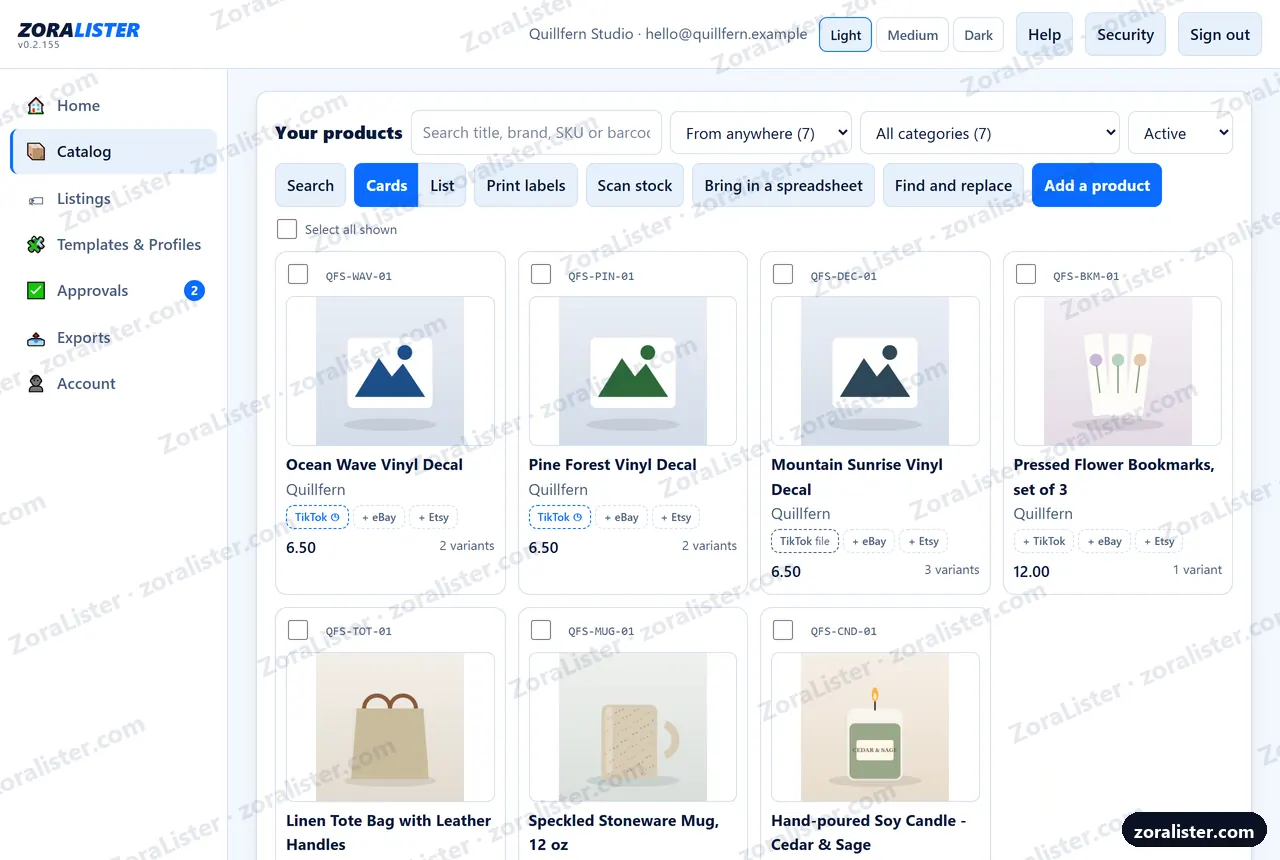
Title, price, brand, condition, weight, description and tags. Options like Color and Size become variants, each with a suggested SKU and its own price, stock and photos. Photos from your computer or your phone's camera, and ZoraLister keeps them, and a video for the listing. Sell it personalized? Buyers write a name or initials in, with your instructions and an extra charge - and a choice of font is a variant, priced each. Or bring in the spreadsheet you already keep. Count stock with a barcode scanner, by typing the code, or with your phone's camera on Android, and change a word in many titles at once with Find and replace.
Pick the category
Select your products and choose the marketplace. For eBay and Etsy, ZoraLister puts each one in the category it came with, or the best fit for its title, fills in what it already knows and checks it. Or search the marketplace's own categories yourself, answer what that category requires and pick your shipping - on eBay, your business policies.
Check, then look
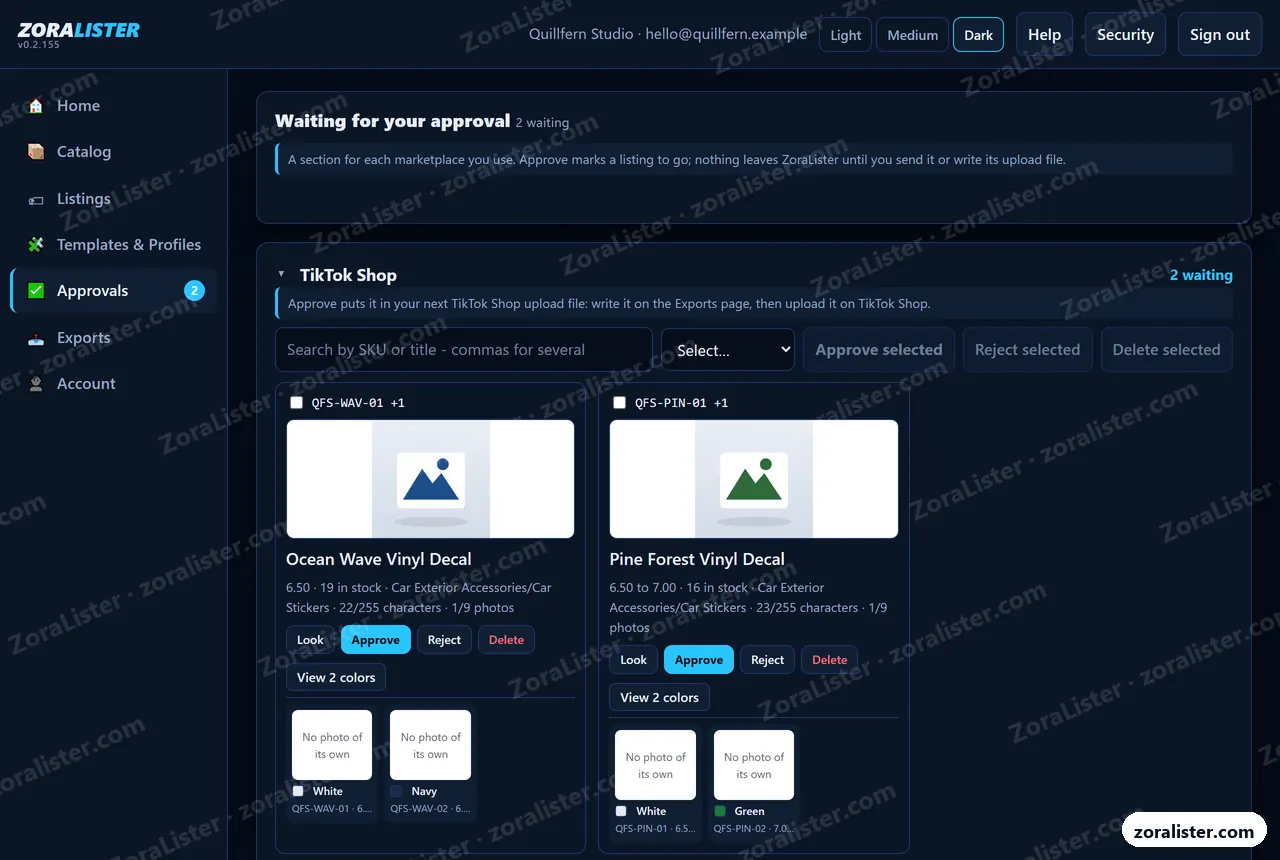
Check says in plain words what each product still needs; on eBay, it asks eBay itself to look the listing over and shows its fee to list. Look shows exactly what the marketplace will get. Approvals has a section for each marketplace you use: approve it, reject it with a reason, or delete a listing you do not want - the product stays.
Approve, and it goes out
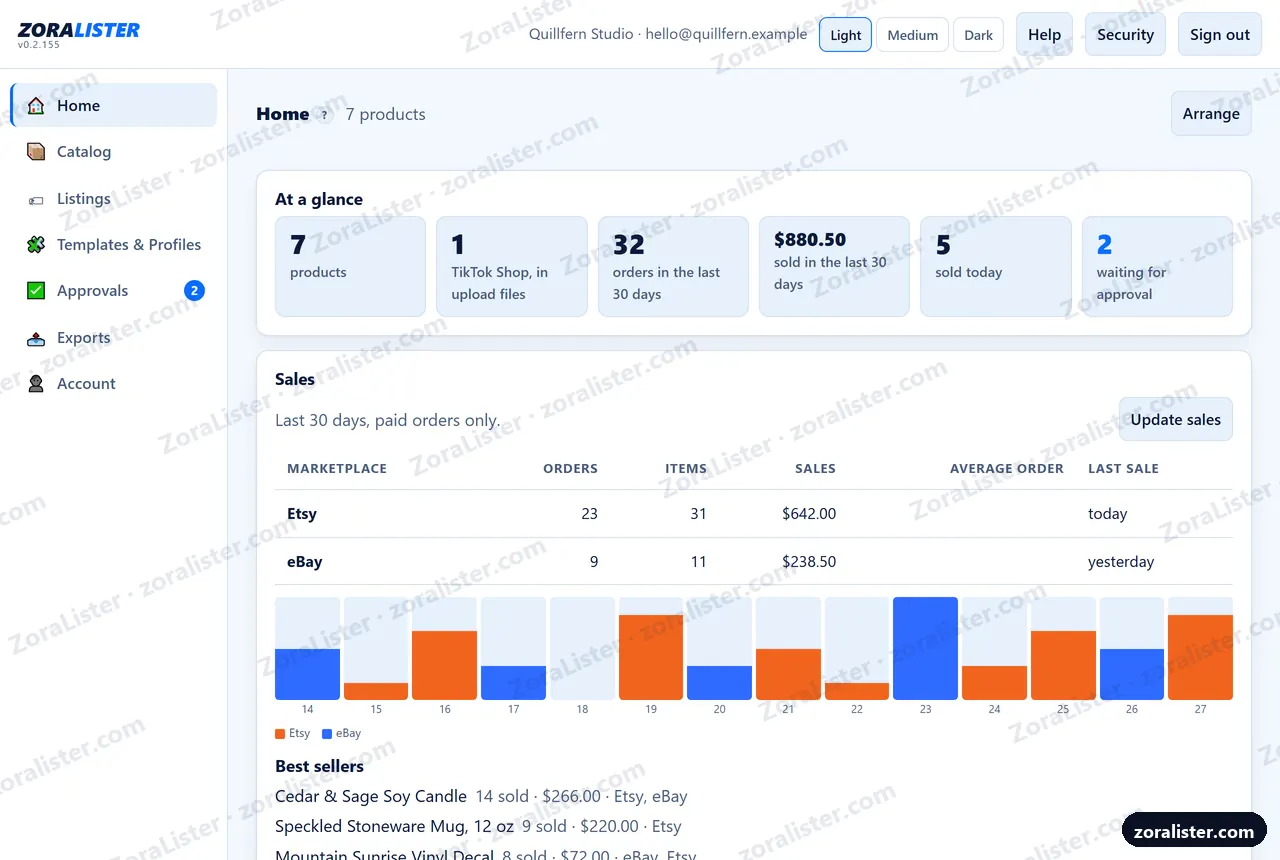
On eBay and Etsy, Approve puts up an ordinary live listing, after one confirm that shows the marketplace's fee. TikTok Shop gets its own bulk upload file, filled in and checked, for you to upload in Seller Center. Then Home shows what sold on eBay and Etsy, and what is on one marketplace but not another.
Change a product after you approved it and it comes back to be checked again. Already sell on eBay or Etsy? Connect it and bring those listings in, photos and choices included, to list them somewhere new. It runs on ZoraLister's server, so you can close the page; a listing that looks like a product you already have waits for you to say whether it is the same one.
Your product. Their spreadsheet. Filled.
This is a real TikTok Shop template row for the Car Stickers category, with its real column letters. Grams become pounds and millimeters become inches because the template asks for them that way. ZoraLister for Windows fills eBay's upload file the same way; in ZoraLister Online, eBay and Etsy need no spreadsheet at all.
Lowered Lifestyle Windshield Banner
- Variant
- Black / Small
- SKU
- BANNER-BLK-S
- Price
- $12.99
- Quantity
- 25
- Weight
- 45 g
- Size
- 584 × 102 × 2 mm
For an upload file: set it up once. List all day.
TikTok Shop takes its own bulk upload file. ZoraLister for Windows, bought once, fills TikTok Shop's and eBay's upload files on your own PC without connecting to any marketplace; the Windows guide shows every screen. ZoraLister has no built-in idea of what a category wants - it reads the template you downloaded, so a template the marketplace changed next month is still right.
Drop in the template
TikTok Shop's bulk upload template from Seller Center, an Excel file. On Windows, eBay's "Create or Schedule new listings" template from Seller Hub works the same way, as Excel or CSV. Drop it on ZoraLister and it reads every column, every dropdown and every rule, including the hidden ones.
Map your fields
Pick your category - a TikTok Shop category, an eBay one, the same screen either way. Most of the mapping is filled in for you: title, price, images, options, package size. Answer the compliance questions once.
Add products
Type them in or import your existing spreadsheet. Colors and sizes become variants. No marketplace spreadsheet in sight.
Review and export
See exactly what each listing will send, approve it, and write a file the marketplace accepts - a copy of your own download, in the format you downloaded, with only the rows filled in. Nothing leaves the app until you say so.
See it before you try it.
Real screens from ZoraLister Online, with a made-up shop in them. See every screen, on a computer and a phone.
Every category plays by different rules.
Required fields beyond the basics, read straight from real TikTok Shop bulk upload templates. ZoraLister knows the number for your category the moment you drop the file in. For eBay and Etsy, ZoraLister Online asks the marketplace itself what your category requires.
- Required fields, per category. A product missing one is held back with a plain message naming the field. It never reaches the file.
- Dropdown values, spelled their way. Strict lists are enforced; suggestion lists are flagged, not blocked.
- Length and number limits. A 273-character title is an error you see, never a silent chop - and once you have checked a product on Listings, it shows its title on each marketplace against that limit: "92 of 80 characters - shorten by 12".
- Variants done right. One listing with every color and size, each with its own SKU, price, stock and photos - so a buyer who picks Red sees the red one. This is where many listers go wrong: ZoraLister sends eBay its photo for each color, gives Etsy the right photo for each choice, and fills TikTok Shop's and Amazon's variant rows with each one's own picture.
- Variants that collide. Two SKUs that would list with the same color and size get caught before the marketplace rejects them.
- Fields your category forbids. Left blank automatically, exactly as the template demands.
- Always current. The rules come from the template you downloaded today, or from eBay and Etsy themselves, not from a copy we shipped months ago.
Live connection to eBay and Etsy. Bulk templates for TikTok Shop and Amazon.
Every listing waits in ZoraLister's approval queue first: you look it over and approve it, and nothing goes to any marketplace - by connection or by file - until you do.
eBay
In ZoraLister Online, the listings you approve in ZoraLister go straight to eBay as ordinary live listings you edit in Seller Hub - with the product's video, on a listing without choices, and its personalization where the category offers it. Prefer a file? eBay's upload file is still there, and it is how ZoraLister for Windows lists on eBay. How eBay bulk listing works.
Etsy
In ZoraLister Online, the listings you approve in ZoraLister go straight to your Etsy shop as live listings, with the product's video and its personalization box - your extra charge included. ZoraLister asks Etsy what your category needs, so there is nothing to download. How Etsy bulk listing works.
TikTok Shop
Drop in TikTok Shop's bulk template for your category; ZoraLister fills it from your products and checks it, and only the listings you approve go into the file you upload in Seller Center. A live connection follows once TikTok Shop approves it. How a TikTok Shop bulk upload works.
Amazon
Drop in Amazon's upload template for your product type; ZoraLister fills it from your products and checks it, and only the listings you approve go into the file you upload in Seller Central. A live connection follows once Amazon approves it.
Shopify
After the TikTok Shop and Amazon live connections.
Where it is going
Planned, in roughly this order. No dates: each one arrives when it works, and the guides say when it has.
- Live connections to TikTok Shop and Amazon, then Shopify. Send straight to them, as you do to eBay and Etsy today.
- One product, not two. Bring the same thing in from eBay and from Etsy, and ZoraLister spots it and lets you keep one - or both.
- More than one shop. Two eBay shops, say, in one ZoraLister.
- Photos from your cloud. Bring photos in from Google Drive, Dropbox or OneDrive.
- Photo first. Take the pictures and get a draft product, with a suggested title and details, for you to review.
- AI help you review. Suggest a title, a description or a price - each a separate button, and you decide what to keep.
Not built today: handling orders (ZoraLister Online shows your eBay and Etsy sales, it does not ship or change them), keeping stock in step across marketplaces, repricing, or changing a listing after it has gone out.
The term 'Etsy' is a trademark of Etsy, Inc. This application uses the Etsy API but is not endorsed or certified by Etsy, Inc.
Rent it, or own it.
The same job, done in the place that suits you. ZoraLister Online runs on our server and opens in a browser - so a Mac, an iPad or a Chromebook is all you need - free to start, with a low monthly fee when you want more - the way you pay for anything somebody keeps running for you. ZoraLister for Windows runs on your own PC, so it costs us nothing to run and you buy it once. They are separate products, bought separately; buying one does not include the other. ZoraLister for Windows is free during its beta.
ZoraLister for Windows
- Bought once, not rented: it runs on your own computer, so there is no monthly fee
- Your products, variants and photos
- Reads your marketplace templates
- Upload files checked before you upload
- Photos pushed to the marketplace for you: no image hosting needed
- A year of updates included, so your files keep matching the latest templates
- Renew if you want more; if you don't, the app you bought keeps working
Choose it if you have a Windows PC and want to keep working on it, want your products in a folder you can see, would rather buy a thing than rent one, and want it to keep working whatever happens to us.
Launch price announced soon. Beta testers help set it. In private beta on Windows 10 and 11.
ZoraLister Online
- The Free plan: every feature, up to 20 new products a month, listed on every marketplace you sell on - no card, no time limit
- Nothing to install: it opens in a browser, so a Mac, an iPad or a Chromebook works as well as Windows
- Sends the listings you approve straight to eBay and Etsy, and fills TikTok Shop's upload file with the same checks
- Photos kept for you, with nothing to paste: pick the main one, give one to each choice, rotate or crop, and see where one falls short of a marketplace's standards
- Already on eBay or Etsy? Bring those listings in to list them somewhere new
- SKU labels to print for your shelf, and stock counted with a barcode scanner or an Android phone's camera
- Find and replace across your products - a misspelled brand fixed once
- Backed up nightly, two-step sign-in (a passkey, or Google then your passkey or code), and an account only you can reach
- Stop paying and you are back on the Free plan: nothing is taken from you, and you can take your files with you
Choose it if you are on a Mac, an iPad or a Chromebook, work from more than one computer or your phone, want listings sent straight to eBay and Etsy, or would rather we kept the backups.
Launch offer: an account made by November 30, 2026 pays $17.50 a month for its first three months on the full plan, then $34.99 (its first subscription only). Paid through PayPal, in US dollars; cancel any time on your Account page. Start free.
Your products stay yours
With ZoraLister for Windows, products, photos and templates live in a folder on your own machine, there is no account, and uninstalling never touches your data. With ZoraLister Online they live on our server instead - that is the trade for signing in from anywhere - and the privacy page spells out exactly what each of them keeps.
Not sure which?
Not a cheap version and a good version - the same work, in the place that suits how you sell. Neither one's data goes into the other unless you move it yourself. Start free online, or ask for a seat in the Windows beta and say how you work - I will tell you which one fits.
Meet ZoraMaker. From the design file to the sale.
3D printing, laser work, vinyl, sublimation - if you make it yourself, ZoraMaker keeps your whole workbench in one place. Every design file. Every spool, roll and blank, counted by pointing your phone at its barcode. What you can make right now, and what each piece really cost - shipping and tax included. And at your next vendor show, sell from your phone, even with no signal.
Then, when it is time to sell online: make it in ZoraMaker, list it with ZoraLister. They work together: in ZoraMaker, Send to ZoraLister puts a finished product - its photos, its choices and how many you really have - on your products in ZoraLister, ready to list, and keeps the count up to date as it changes in ZoraMaker. Each send says who is signed in to ZoraMaker, and ZoraLister takes it only into that person's account - so a product never lands in the wrong shop. What a piece cost stays in ZoraMaker: your listing price is always the one you set.
From the makers of ZoraLister. Invite-only early access while we test it with a few makers - join the waitlist on zoramaker.com. ZoraMaker works on its own, too: plenty of makers only sell at shows.
- DesignDrop in the files you bought or made. Name, designer and license fill in, and your originals are never changed.
- StockScan a spool or a pack of blanks. Know what you have, and get a shopping list before you run out.
- MakeSee what you can make with what is on the shelf, and what each piece cost you.
- SellAcross the table at a show from your phone - or on eBay, Etsy and TikTok Shop with ZoraLister.
Bulk uploads, plainly answered.
What is a TikTok Shop bulk upload template?
It is the Excel file TikTok Shop's Seller Center gives you for listing many products at once. You pick a category, download the template, fill in a row for each product or variant, and upload it back. Which columns exist, which of them are mandatory and which values each dropdown accepts all depend on the category, and they change when TikTok revises the template. ZoraLister reads that file and fills it in from your products.
Why did my TikTok Shop bulk upload fail without saying which field was wrong?
Because the message is often generic. "Fill out a field correctly" can mean a missing required field, a dropdown value spelled differently from TikTok's list, a title over the length limit, a column your category forbids that was not left blank, or an image link TikTok could not fetch in time. ZoraLister checks your products against your own template before a file is written, and names the product and the field in plain words.
Does ZoraLister work with Amazon, eBay, Shopify or Etsy?
Yes - eBay and Etsy by live connection. In ZoraLister Online, connect your eBay account and your approved listings go straight to eBay, as ordinary listings you edit in Seller Hub - no template needed; ZoraLister for Windows fills eBay's upload template instead. Etsy too, in ZoraLister Online: connect your Etsy shop, bring your listings in, build Etsy listings checked against your category's own fields, approve them in ZoraLister, and send them straight to your shop as live listings. Amazon and TikTok Shop by bulk template: drop in the marketplace's own upload template, ZoraLister fills it from your products and checks it, and you upload it in Seller Central or Seller Center. A live connection to each follows once Amazon and TikTok Shop approve it. Shopify comes after. The products you add now are the ones those marketplaces will use, so nothing gets entered twice.
Can I bring in the listings I already have on eBay or Etsy?
With ZoraLister Online, yes. Connect your eBay account or your Etsy shop on the Account page - you sign in on the marketplace's own page, and bringing listings in only reads them. Select the listings you want and each one becomes one of your products, with its photos, price, quantity and choices, ready to edit and list somewhere else. Nothing on eBay or Etsy is changed. ZoraLister for Windows does not connect to marketplaces.
Is ZoraLister real, and is it safe to connect my eBay or Etsy shop?
Yes, and you can check. You connect on eBay's or Etsy's own sign-in page, so your password never reaches us, and you can take the permission back there or with Disconnect in ZoraLister. Nothing is listed or changed until you approve it, ZoraLister never ends or deletes a listing on eBay or Etsy, and it reads your sales only to show them to you - the items sold, never who bought them. Sign in with a passkey - Face ID, your fingerprint or Windows Hello - and there is nothing to type, so a fake page has nothing to catch; your password and code stay as the way back. Sign in with Google works too, once you connect it, and still asks for your passkey or code after it. We never message you first or ask for money outside your Account page. You can start free without a card, and the about page says who built it.
Does anything go to Etsy or eBay without me seeing it first?
No. In ZoraLister Online, every listing waits for you: Look shows exactly what the marketplace will get, and only what you approve goes out - when you press Approve on Approvals and confirm, or Send on the Listings page. On eBay you see eBay's own fee quote before anything goes live. Once a listing is on eBay or Etsy, ZoraLister changes it only when you approve a change, never ends or deletes it, and never changes an order - it only reads your sales, to show them on Home.
Is there a phone app?
ZoraLister Online works on your phone and goes on your home screen like an app, with its own icon, full screen - nothing to download from an app store. On an iPhone, open it in Safari and tap Share, then Add to Home Screen; on Android, tap Install. Take product photos with the phone's camera, count your stock by pointing the camera at a barcode (where the browser can read them, as Chrome on Android does), and list from there.
Which eBay template does ZoraLister use?
In ZoraLister Online, none: connect your eBay account and your approved listings go straight to eBay. ZoraLister for Windows - or Online, if you prefer a file - uses the one eBay gives you: "Create or Schedule new listings", from Seller Hub under Reports and then Uploads. eBay offers it as an Excel file or as a CSV, and ZoraLister reads either. It takes the item specifics your category asks for straight out of that download, writes a row per listing with a child row for each variation, and gives you back a file in the same format you started with. Your own download is never changed.
I am new to TikTok Shop. Can ZoraLister get my first products online?
Yes. You need your own TikTok Shop seller account first; ZoraLister does not open one for you. Once you have it, bulk upload is the quickest way to get a whole product list online, and it is where new sellers lose the most time, because the template does not explain itself. Add your products to ZoraLister once, drop in the template for your category, and it shows you exactly what each listing will send and what TikTok would reject, before you upload anything.
How is this different from a cross-listing tool?
A cross-listing tool copies a listing from one marketplace to another. ZoraLister Online does that too: bring your eBay or Etsy listings in and list them on the other, after you approve each one. The difference is where it starts: your own products, checked against each marketplace's rules for your category before anything is sent. Prefer to work on your own PC? ZoraLister for Windows builds checked bulk upload files without connecting to any marketplace.
Are my products uploaded to your servers?
ZoraLister for Windows: no. Your products, prices, photos and templates stay in a folder on your own PC, and there is no account or sign-in. The one thing that ever leaves your machine is a copy of a product photo, and only if you turn on image push and export a file: the marketplace needs a web address it can fetch, so the copy is sent for it to collect and then deleted automatically a few days later. Nothing else is ever sent. ZoraLister Online: yes - that is what lets you sign in from any computer or your phone. Your products and photos are kept on our server, in an account only you can reach, and backed up nightly - and you can download all of it, any time, as one zip file (Download everything, on the Account page). The privacy page says exactly what each of them keeps.
Is there a monthly fee or a subscription?
ZoraLister for Windows: no monthly fee - buy it once. It runs on your own computer, and the purchase includes a year of updates, so your files keep matching the marketplaces' latest templates. After that, renewing is optional; if you do not renew, the version you bought keeps working, with everything you made in it. It is free during the private beta. ZoraLister Online: free to start - the Free plan has every feature and up to 20 new products a month, with no card and no time limit. For no monthly limit, the full plan is $34.99 a month (launch offer: $17.50 a month for the first three months of an account's first subscription, for an account made by November 30, 2026), paid through PayPal and cancelled any time on your Account page. The price of ZoraLister for Windows has not been announced yet.
What do I need to run it?
For ZoraLister Online, a browser - which means a Mac, an iPad, a Chromebook or a Windows PC, and nothing to install. For ZoraLister for Windows, a PC with Windows 10 or 11: it installs for your own user account without an administrator prompt, and uninstalling never touches your data. During its beta, testers we invite download it from the Account page in ZoraLister Online, and the installer is not code-signed yet, so Windows may ask you to confirm before running it. There is no Mac app yet - if you are on a Mac, the hosted version is the one for you today.
Sell on TikTok Shop, eBay or Etsy? Start free today.
ZoraLister Online is open to anyone. The Free plan has every feature and up to 20 new products a month, with no card and no time limit; upgrade any time for no monthly limit.
Your shop's name and your email address - we send a link to choose your password. Want ZoraLister for Windows instead? It is in private beta: ask for a seat.